Polling: Gamepad Polling Rate Tester
A downloadable tool for Windows
Measure the True Performance of Your Gamepad!
Ever wondered if your gamepad is performing at its peak? Polling is a powerful, easy-to-use tool designed to measure the polling rate, and stability of your controller. Whether you're a competitive gamer demanding precision or a hardware enthusiast, this tool gives you the detailed data you need.
Key Features:
- Average Polling Rate (Hz): See the real-world frequency at which your controller communicates with your PC. Is it 125Hz, 500Hz, or the full 1000Hz? Now you can know for sure.
- Steam Direct Input via HID: Test your Steam Controller's native hardware polling rate directly. By bypassing the Steam client entirely, the tool uses low-level HID communication to disable Lizard Mode and read raw controller reports, measuring the true sensor performance of the hardware.
- Jitter Measurement: Understand the stability of your connection. Lower jitter means a more consistent and predictable input stream, crucial for competitive gaming.
- Advanced Outlier Report: Using a robust IQR statistical method, the tool intelligently identifies and reports input spikes or anomalies that could affect your gameplay.
- Real-time Log with Smart Highlighting: Watch the data come in live! After the test, the log is instantly re-analyzed and outliers are highlighted, giving you a clear visual representation of your gamepad's performance.
- Personalized Web Reports: Upload your results to Gamepadla.com to see detailed graphs and compare your controller with others in our database.
- Multi-Controller Support: If you have multiple gamepads connected, you can easily choose which one to test.
How to Use:
- Connect your gamepad.
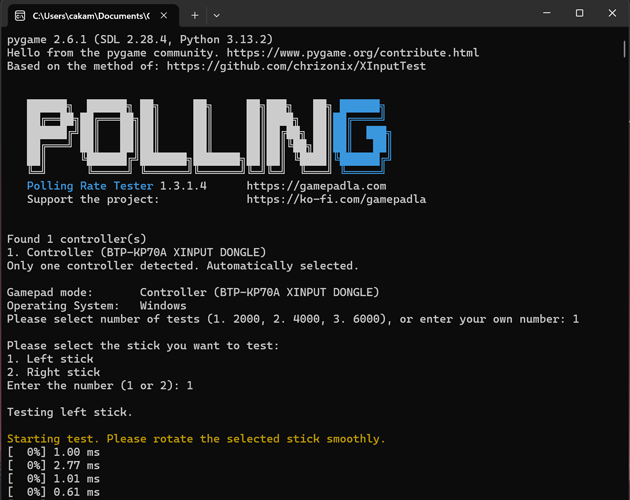
- Run the application.
- Select the controller and the number of tests you want to run.
- Choose which analog stick you want to test.
- Rotate the stick smoothly in circles until the test is complete.
- Analyze your results in the app or online!
This tool is open-source and built with Python. We are dedicated to providing the community with a reliable way to test and understand their gaming hardware.
A Note on Versions:
We offer two versions for download:
- v2.x.x.x (Recommended): Uses a new, more accurate algorithm that measures the X and Y axes independently. This eliminates "transition artifacts" (false 1ms events) and allows for correct testing of high-polling-rate gamepads (up to 8000Hz).
- v1.x.x.x (Classic): Based on the XInputTest methodology. Useful for comparing results with that tool, but it has limitations: it can show false "artifacts" during diagonal movement and cannot accurately measure polling rates significantly higher than 1000Hz.
Support the Project:
If you find this tool useful, please consider supporting its development on Ko-fi!
Project page on Github https://github.com/cakama3a/Polling
Download
Leave a comment
Log in with itch.io to leave a comment.